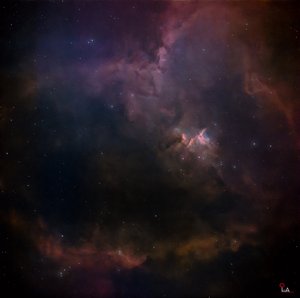
What Is SHO Color (Hubble Palette)? Understanding the Science and Art Behind Astrophotography Colors
What Is SHO Color (Hubble Palette)? In astrophotography, SHO Color refers to a color palette created by assigning data captured through narrowband filters—Sulfur (SII), Hydrogen (Ha), and Oxygen (OIII)—to colors that the human eye can perceive. SHO is also known as the Hubble Palette, which became famous because it was used by NASA's Hubble Space Telescope for color mapping. How Are Colors Assigned in the SHO Palette?
In the SHO palette, each emission line is mapped to RGB colors as follows:
SII (Sulfur-II) → Red
Ha (Hydrogen-alpha) → Green
OIII (Oxygen-III) → Blue
The acronym SHO itself stands for:
S = Sulfur (SII)
H = Hydrogen (Ha)
O = Oxygen (OIII)
Why Isn't SHO a Natural Color?
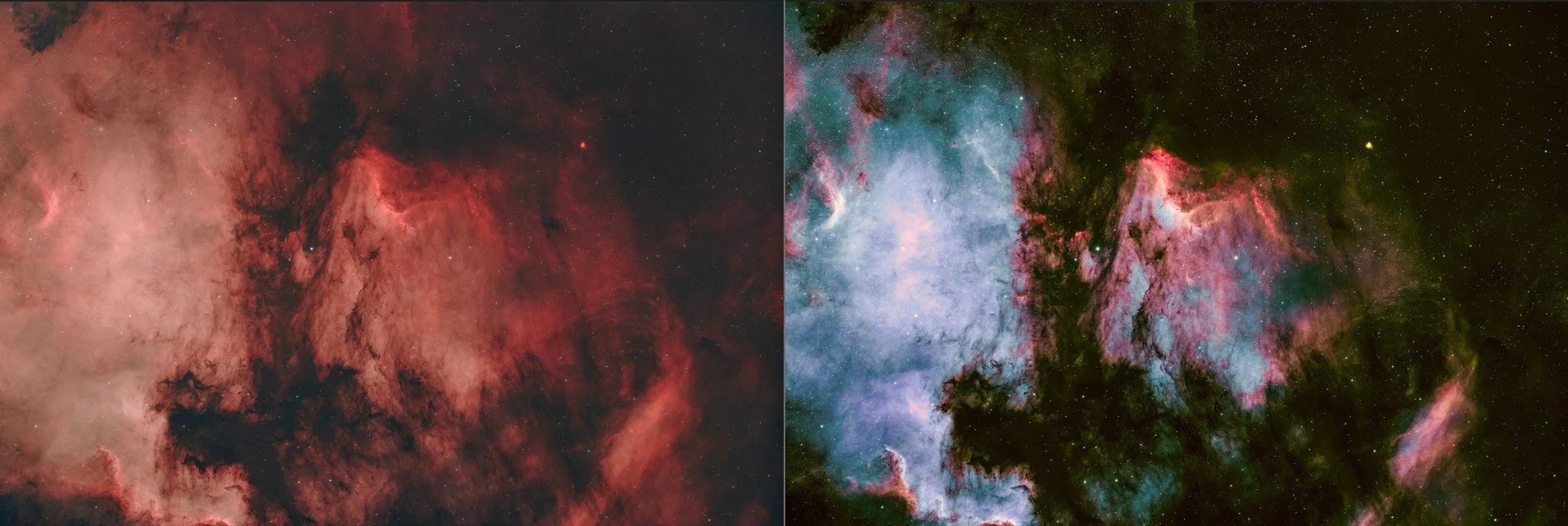
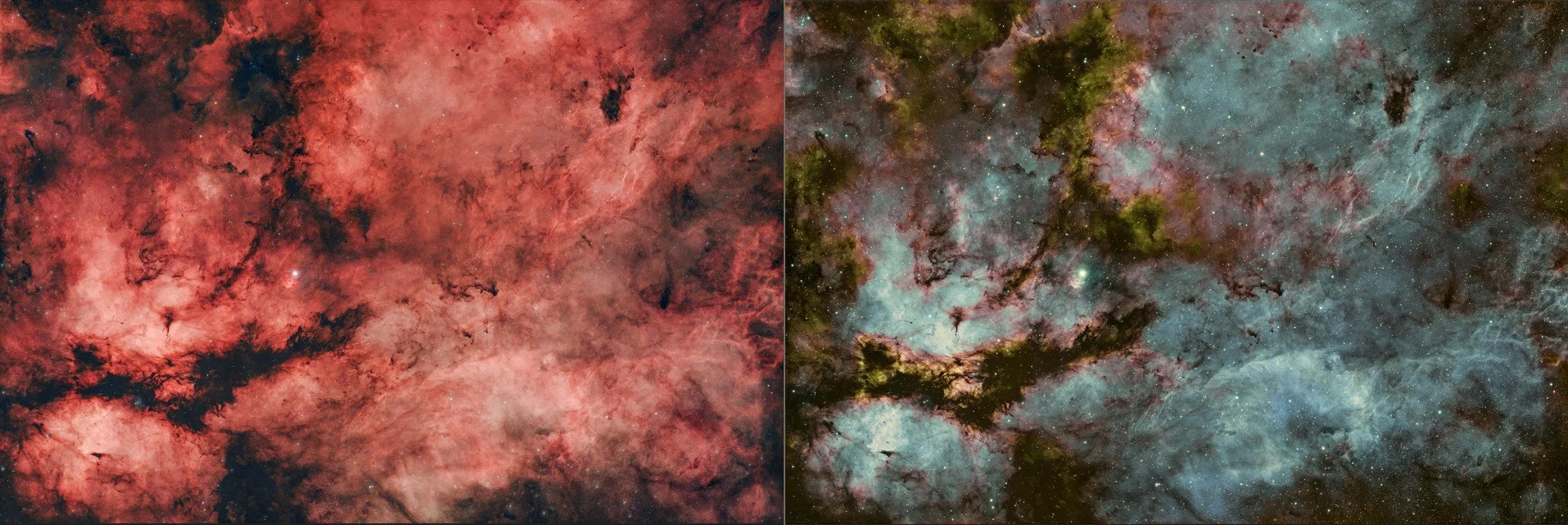
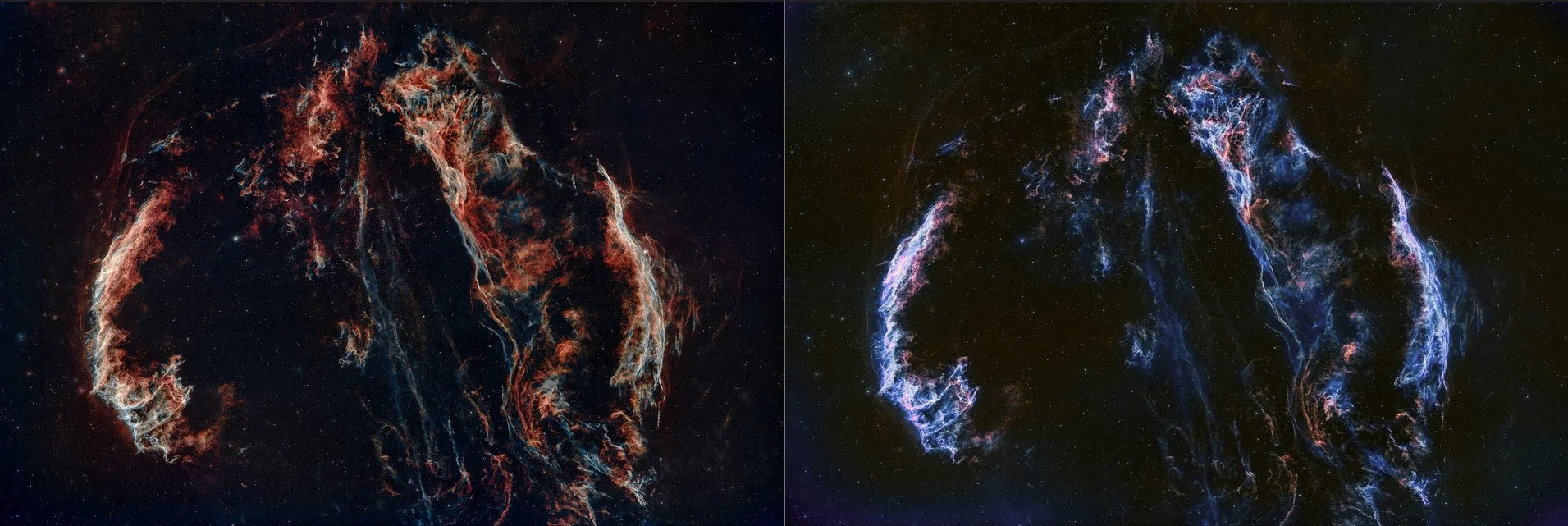
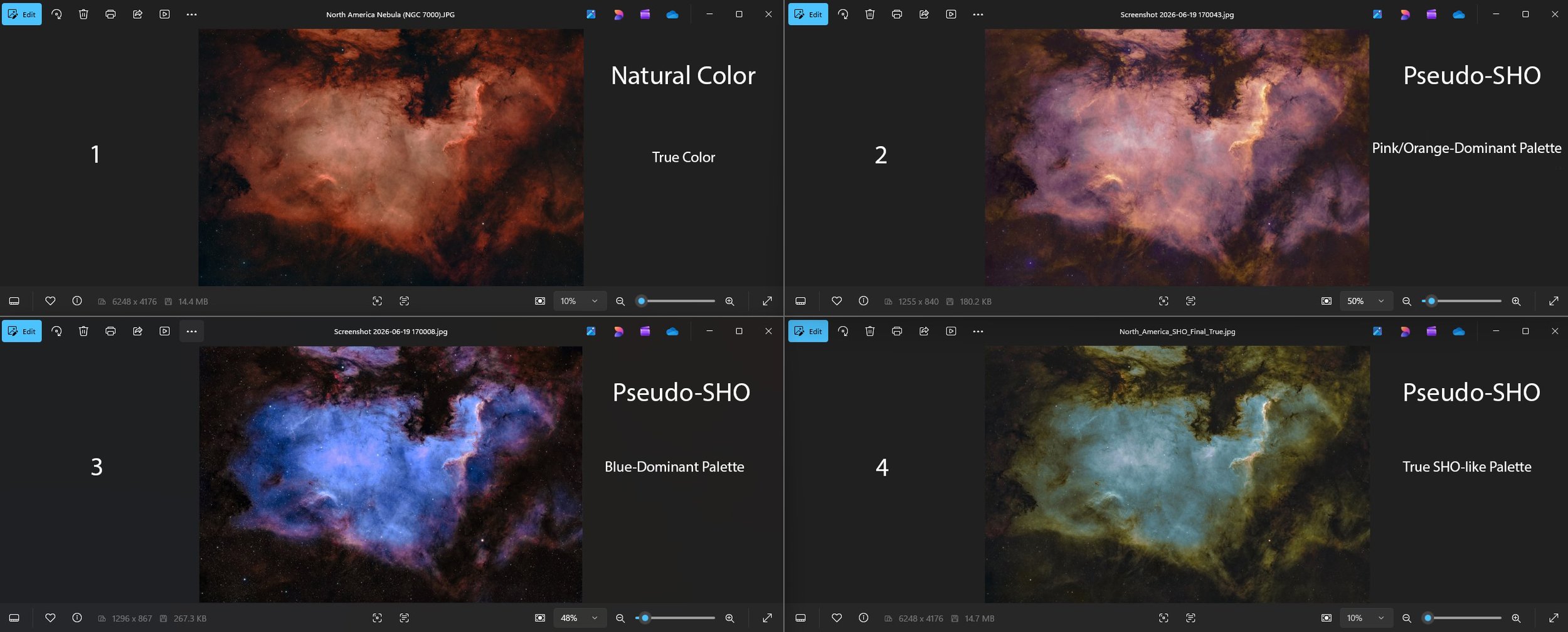
If we could look directly at nebulae with our eyes, their colors would not appear vivid or easily visible. Narrowband filters capture only specific wavelengths of light emitted by different elements. Therefore, the SII, Ha, and OIII data are reassigned into RGB colors using computer software to make the structures visible. For this reason, SHO color is considered a false color or artistic color mapping, rather than the actual colors visible to the human eye. Why Do SHO Images Look Different From One Another? Not all SHO images have the same appearance. Several factors contribute to these differences.
1. Different Elemental Composition: Every nebula contains different proportions of sulfur, hydrogen, and oxygen. For example: Regions rich in oxygen often appear blue or cyan. Areas containing more hydrogen and sulfur tend to show gold or orange tones.
2. Different Processing Techniques: The final colors can vary depending on how the image is processed using software such as PixInsight, Photoshop, or Siril. Factors such as: Channel mixing, PixelMath ratios, Color calibration, Curves transformation, SCNR, Color saturation, all influence the final appearance and may differ from one user to another.
3. Personal Artistic Preference
Each astrophotographer has their own preferred color style, which also contributes to the differences seen among SHO images. The main purpose of creating SHO images is to enhance the visibility of the various gas components and reveal the fine structural details within astronomical objects, allowing them to be distinguished more clearly.
SHO Palette: Science Meets Art. Because the SHO palette presents scientific data in an artistic way, many astrophotographers create their own variations, including: Gold and Blue, Bronze and Cyan, Deep Blue and Gold, Red and Blue, and many other creative color combinations. Why Are SHO Images Often Green? Hydrogen-alpha (Ha) is assigned to the green channel. As a result, immediately after channel combination, SHO images often appear overwhelmingly green. To achieve more aesthetically pleasing colors, astrophotographers commonly use: SCNR, Curves Transformation, Color Masks, PixelMath to reduce green and enhance gold and blue tones. Generally: Gold and orange regions represent areas rich in sulfur and hydrogen. Blue and cyan regions indicate oxygen-rich regions. Green represents strong hydrogen-alpha emission, although it is usually reduced during processing. Is SHO Color Scientific or Artistic? The answer is both. From a scientific perspective, SHO imaging separates SII, Ha, and OIII emissions, allowing astronomers to study the distribution and structure of gases within nebulae. From an artistic perspective, the final appearance depends on the astrophotographer's creativity and color preferences, enabling the creation of visually stunning images.
When I first started doing astrophotography, I was honestly not one of those people who loved the SHO color palette. The reason was simple: I didn't like it because it wasn't the natural color of nebulae. Even back then, however, I acknowledged that SHO images were beautiful. As time went by and I reached a stage where I could produce better images, I started thinking about trying SHO imaging. But shooting in SHO usually requires a mono camera, which is more expensive than a color camera. In addition, several filters have to be used, and the editing process becomes much more complicated with many extra steps. Because of that, I ended up continuing with an OSC (One Shot Color) camera—also known as a color camera—and have been using it ever since. Still, as a photographer, I naturally want my images to look beautiful. So over the past few years, I have continuously studied and practiced different techniques that make it possible to achieve an SHO-like appearance using an OSC camera. Because of that, I am now planning to share my images in both their original processing style and in SHO colors. Of course, the original natural color edit will always remain my priority. I don't intend to move away from it completely, because I also want to share what the natural colors of these space objects actually look like.
In reality, making an OSC image look like an SHO image is much easier to say than to do. I encountered countless problems before eventually finding a method that suited me. The main challenge is that the narrowband filters commonly used with OSC cameras cannot capture Sulfur (SII) data directly. I spent nearly two months studying, experimenting, failing, learning again, and trying repeatedly. There were moments when I almost gave up, which is why I truly value the knowledge I gained in the end. During that period, I spent almost twelve hours a day in front of my computer. The software contains so many features and functions that the real challenge is figuring out which ones are actually useful for the specific result you want. Before I understood what I was doing, I was constantly experimenting—wondering whether one tool or another might be the answer. It definitely requires a significant investment of time. No matter how many tutorial videos I watched on YouTube or how many questions I asked AI tools like ChatGPT, I often found that simply following the instructions didn't work in practice. So when I finally discovered a workflow that genuinely worked, I was incredibly happy. Another reason I have come to appreciate SHO processing is that, when comparing two versions of the same image, I feel that the SHO palette makes dust lanes, gas patterns, filaments, and emission structures stand out more clearly. The way SHO maps different emission lines into colors reveals many details that are not as obvious in natural-color images. So, someone like me—who once found it difficult to accept the SHO palette—has now become someone who genuinely enjoys it. By the way, SHO images captured with an OSC camera are referred to by various names, such as Pseudo SHO, Synthetic SHO, OSC SHO, SHO-inspired palette, and Hubble Palette interpretation.
Conclusion: SHO color is an artistic false-color palette that visualizes the distribution of sulfur, hydrogen, and oxygen within celestial objects. There is no single "correct" color for SHO images. Variations in nebula type, data quality, and image-processing techniques naturally lead to different color renditions. In fact, this diversity is one of the unique beauties of astrophotography itself.
Clear skies and happy observing…..
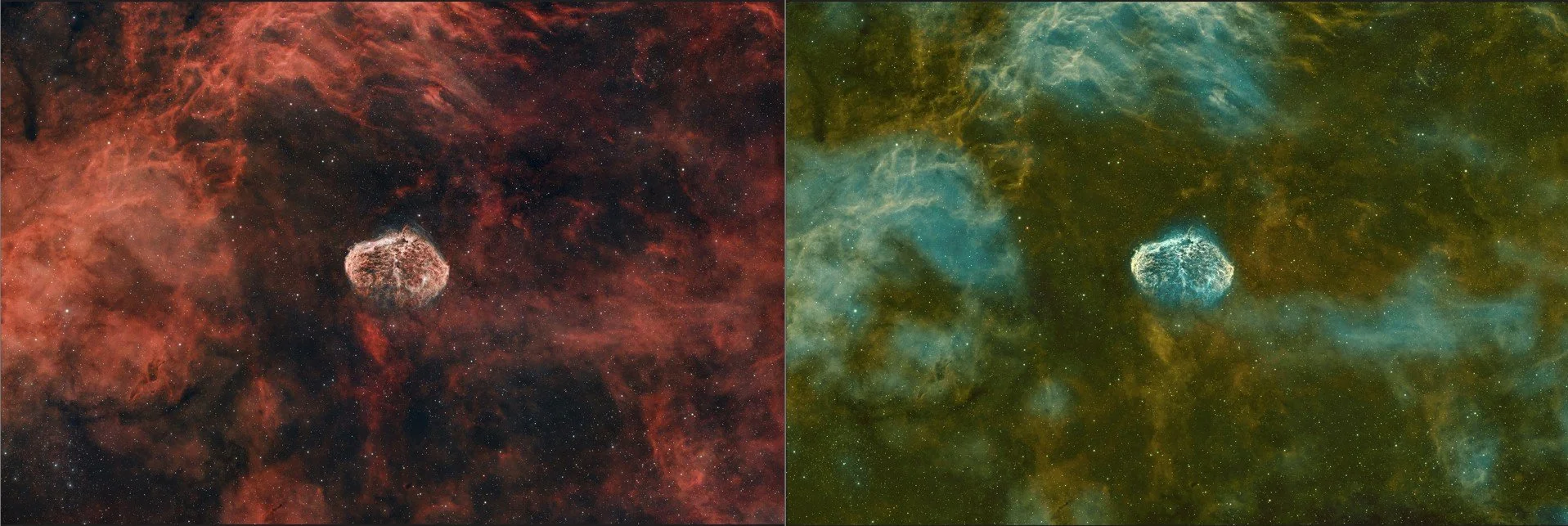
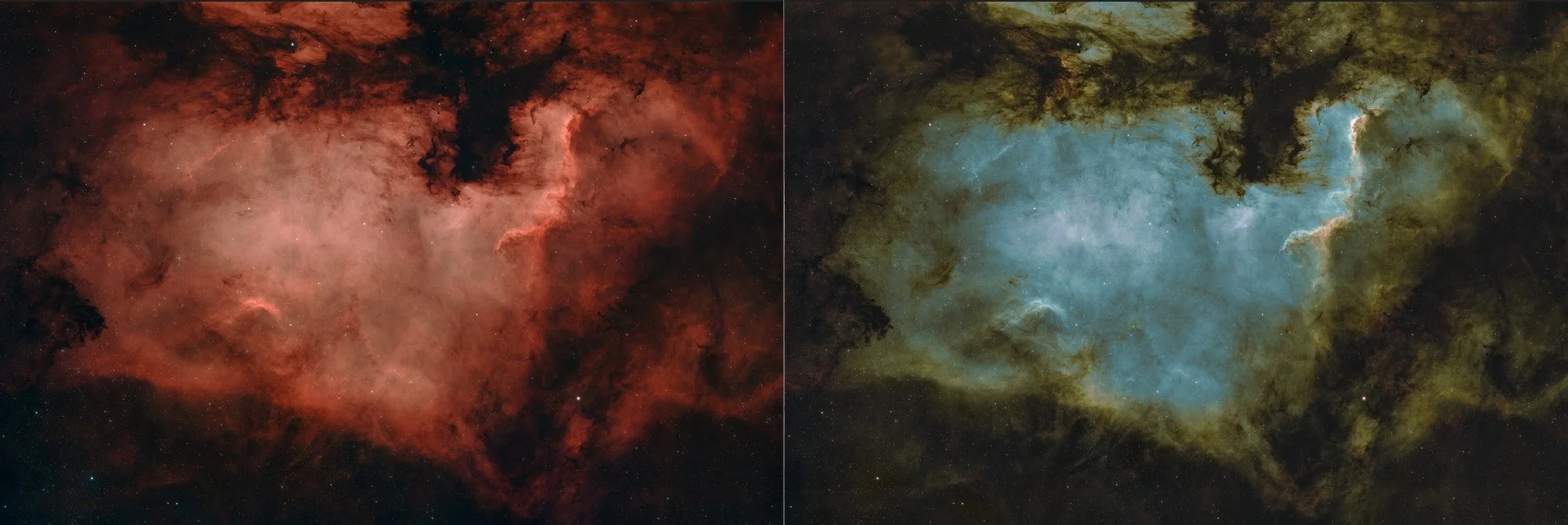
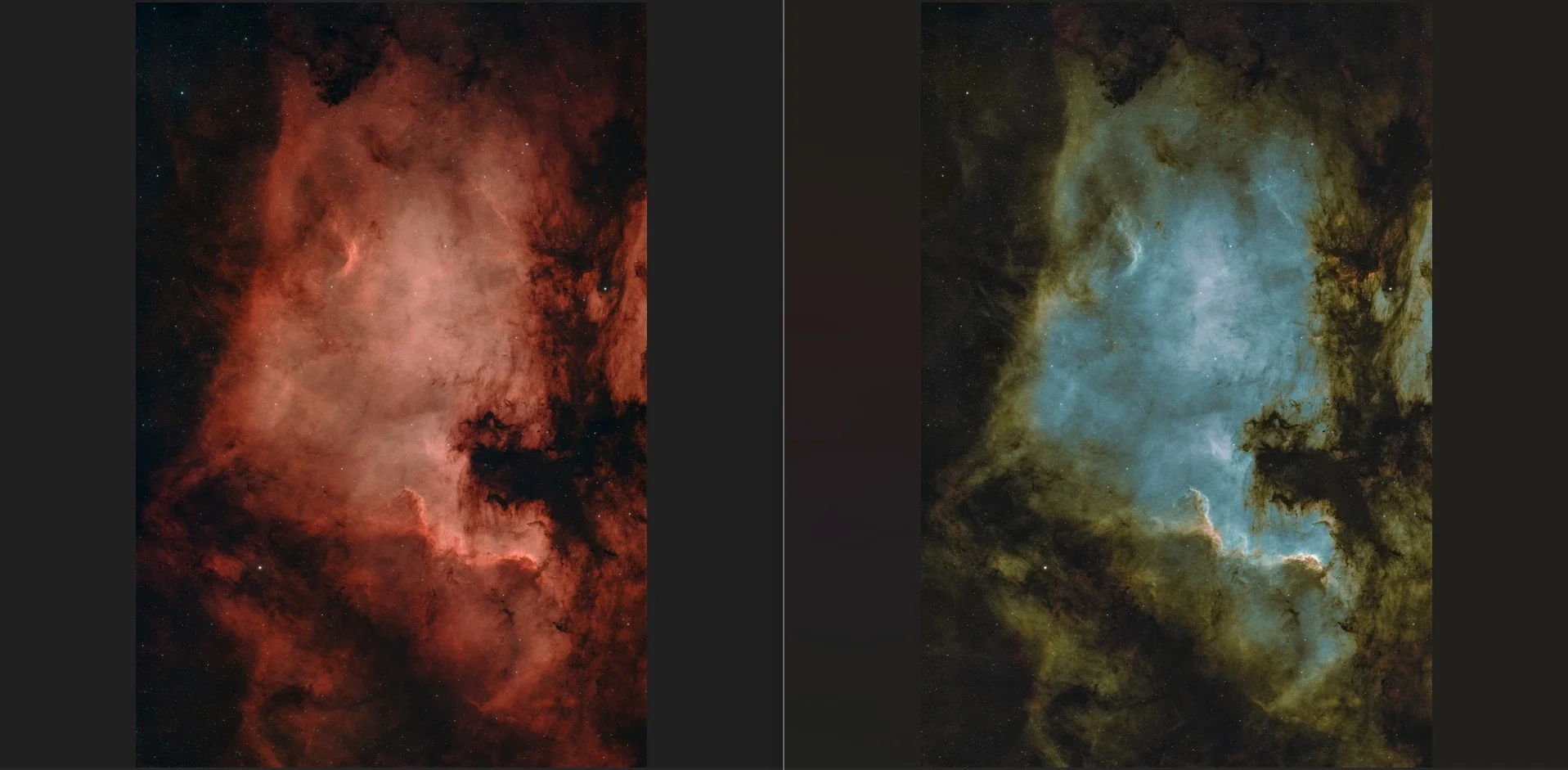
SHO Color (Hubble Palette) ဆိုတာဘာလဲ။ Astrophotography လောကမှာ SHO Color ဆိုတာ Narrowband Filter တွေကနေ ဖမ်းယူထားတဲ့ Sulfur (SII), Hydrogen (Ha) နဲ့ Oxygen (OIII) အချက်အလက်တွေကို လူတွေ မြင်နိုင်တဲ့ အရောင်တွေအဖြစ် ပြန်လည် သတ်မှတ်ပေးထားတဲ့ Color Palette တစ်မျိုးဖြစ်ပါတယ်။ SHO ကို "Hubble Palette" လို့လည်း ခေါ်ကြပြီး NASA ရဲ့ Hubble Space Telescope မှ အသုံးပြုခဲ့တဲ့ Color Mapping နည်းလမ်းကြောင့် နာမည်ကြီးလာခဲ့တာပါ။ SHO မှာ အရောင်တွေကို ဘယ်လို သတ်မှတ်ထားသလဲ။ SHO Palette မှာ Emission Line တစ်ခုချင်းစီကို RGB Color တွေထဲမှာ အောက်ပါအတိုင်း သတ်မှတ်ထားပါတယ်။ SII (Sulfur-II) → အနီရောင် (Red)၊ Ha (Hydrogen-alpha) → အစိမ်းရောင် (Green)၊ OIII (Oxygen-III) → အပြာရောင် (Blue) တို့ပါပဲ။ အတိုကောက် SHO ဆိုတာလည်း S = Sulfur (SII)၊ H = Hydrogen (Ha)၊ O = Oxygen (OIII) ကို ကိုယ်စားပြုတာ ဖြစ်ပါတယ်။
ဘာကြောင့် သဘာဝအရောင်မဟုတ်တာလဲ။ အာကာသထဲက Nebula တွေဟာ လူ့မျက်စိနဲ့ တိုက်ရိုက်ကြည့်ရင် အရောင်တွေ ထင်ရှားစွာ မမြင်ရပါဘူး။ Narrowband Filters တွေက သတ်မှတ်ထားတဲ့ လှိုင်းအလျား (Wavelength) တွေကိုသာ ဖမ်းယူပေးတာ ဖြစ်ပါတယ်။ ထို့ကြောင့် SII, Ha နဲ့ OIII Data တွေကို ကွန်ပျူတာ Software များဖြင့် RGB Color တွေထဲ ပြန်လည် သတ်မှတ်ပြီး မြင်သာအောင် ပြသရတာပါ။ ဒါကြောင့် SHO Color ဟာ "False Color" သို့မဟုတ် "Artistic Color Mapping" ဖြစ်ပြီး အမှန်တကယ် လူ့မျက်စိမြင်ရတဲ့ အရောင်မဟုတ်ပါဘူးခင်ဗျ။ SHO Image တွေမှာ ဘာကြောင့် အရောင်မတူကြတာလဲ။ SHO နည်းလမ်းနဲ့ ရိုက်ထားတဲ့ ပုံတိုင်း အရောင်မတူကြပါဘူး။ အကြောင်းရင်းများကတော့ Nebula တစ်ခုချင်းစီမှာ Element ပမာဏမတူခြင်းနှင့် Nebula တစ်ခုချင်းစီမှာ Sulfur, Hydrogen နဲ့ Oxygen ပါဝင်မှု အချိုးအစား မတူကြခြင်းတို့ကြောင့်ပါပဲ။ ဥပမာအနေနဲ့ရှင်းပြရရင် Oxygen များတဲ့ နေရာတွေမှာ အပြာရောင်၊ Cyan ရောင်များ ပိုမိုပေါ်လာနိုင်ပြီး Hydrogen နဲ့ Sulfur များတဲ့ နေရာတွေမှာတော့ ရွှေရောင်၊ လိမ္မော်ရောင်များ ပိုမို ပေါ်လာနိုင်သည်။ နောက်တစ်ချက်က Image Processing နည်းလမ်းမတူခြင်းပါပဲ။ PixInsight, Photoshop သို့မဟုတ် Siril တို့ဖြင့် Processing လုပ်ရာမှာ Channel Mixing, PixelMath Ratio, Color Calibration, Curves Transformation, SCNR, Color Saturation စသည့် အဆင့်များက သုံးတယ့် user အပေါ်မူတည်ပြီးကွဲပြားနိုင်ခြင်းကြောင့် နောက်ဆုံးအဆင့်အရောင်များလည်း မတူကြတာပါ။ နောက်ပြီး Photographer တစ်ဦးနှင့် တစ်ဦး အရောင်ကြိုက်နှစ်သက်မှု မတူခြင်းကလည်း နောက်ဆုံးအဆင့်အရောင်ကွဲပြားခြင်းကိုဖြစ်စေတယ့် အချက်တစ်ချက်အနေနဲ့ပါဝင်ပါတယ်။ SHO ကို create လုပ်ရခြင်းရဲ့အဓိကရည်ရွယ်ချက်က ဘာလဲဆိုတော့ နက္ခတ္တဗေဒအရာဝတ္ထုတွေထဲမှာရှိတဲ့ ဓာတ်ငွေ့အမျိုးအစားများနဲ့ ဖွဲ့စည်းပုံအသေးစိတ်တွေကို ပိုမိုထင်ရှားစွာ ခွဲခြားမြင်နိုင်စေရန် ဖြစ်ပါတယ်။
SHO Palette သည် သိပ္ပံဆိုင်ရာ Data ကို အနုပညာဆန်စွာ ဖော်ပြပေးခြင်း ဖြစ်သောကြောင့် အချို့သောသူများသည် ရွှေရောင် + အပြာရောင်, Bronze + Cyan, Deep Blue + Gold, Red + Blue စသည်ဖြင့် မိမိနှစ်သက်ရာ အရောင်များကို ပြောင်းလဲဖန်တီးကြပါတယ်ခင်ဗျ။ SHO Image တွေမှာ အစိမ်းရောင်များတာ ဘာကြောင့်လဲ။ အဓိကကတော့ Hydrogen-alpha (Ha) ကို Green Channel ထဲမှာ ထည့်ထားသောကြောင့် Channel Combination ပြီးပြီးချင်း အစိမ်းရောင် အလွန်များနေတတ်ပါတယ်။ ထို့ကြောင့် Astrophotographers များသည် SCNR, Curves Transformation, Color Masks, PixelMath တို့ကို အသုံးပြုပြီး အစိမ်းရောင်ကို လျှော့ချကာ ရွှေရောင်နှင့် အပြာရောင်များ ပိုမိုထင်ရှားလာအောင် ပြုပြင်ကြတာပါ။ နောက်ပြီး SHO Image တွေမှာ အများဆုံးတွေ့ရလေ့ရှိတယ့်အရောင်တွေဖြစ်တယ့် ရွှေရောင်၊ လိမ္မော်ရောင်တွေက Sulfur နှင့် Hydrogen ပမာဏများသော ဒေသများကို ကိုယ်စားပြုတာဖြစ်ပြီး အပြာရောင်၊ Cyan အရောင်တွေကတော့ Oxygen-III ပမာဏများသော နေရာများကို ကိုယ်စားပြုတာပါ။ အစိမ်းရောင်ကိုတော့ Hydrogen-alpha အားကောင်းသော နေရာများတွင် တွေ့ရနိုင်သော်လည်း Processing ပြုလုပ်စဉ်တွင် များသောအားဖြင့် လျှော့ချလေ့ရှိကြပါတယ်။ အိုကေ SHO Color ဟာ အနုပညာလား၊ သိပ္ပံလား။ အဖြေကတော့ SHO Palette သည် အနုပညာရော၊ သိပ္ပံရော နှစ်မျိုးစလုံးပါပဲလို့ဖြေပါရစေ။ ဘာဖြစ်လို့လဲဆိုတော့ သိပ္ပံပိုင်းအရကြည့်မယ်ဆိုရင် SII, Ha နှင့် OIII Data များကို ခွဲခြားပြသပေးနိုင်သောကြောင့် Nebula အတွင်းရှိ ဓာတ်ငွေ့များ၏ ဖြန့်ကျက်ပုံကို လေ့လာနိုင်သလို အနုပညာပိုင်းအရကြည့်မယ်ဆိုရင်တော့ Photographer တစ်ဦးချင်းစီ၏ အရောင်အသွေးနှင့် ဖန်တီးမှုစိတ်ကူးပေါ်မူတည်၍ လှပသော ပုံရိပ်များကို ဖန်တီးနိုင်တာမို့လို့ပါပဲခင်ဗျ။
ကျွန်တော် astrophotography ရိုက်နေတယ့်အစောပိုင်းကာလတွေတုန်းက SHO color တွေကိုသဘောကျတယ့်အထဲမှာပါတယ့်သူတစ်ယောက်တော့ မဟုတ်ခဲ့ဘူးခင်ဗျ။ ဘာဖြစ်လို့လဲဆိုတော့ အဖြေကရှင်းပါတယ် nebula တွေရဲ့ပင်ကိုယ်သဘာဝအရောင်မဟုတ်ဘူးဆိုတယ့် အချက်တစ်ချက်ထဲနဲ့ကိုမကြိုက်ခဲ့တာပါ။ ဒါပေမယ့် SHO အရောင်တွေကလှတယ်ဆိုတာကိုတော့ အဲဒီအချိန်ကတည်းကလက်ခံခဲ့ပါတယ်။ နောက်ပိုင်း ပုံတွေကိုကောင်းကောင်းရိုက်နိုင်လာတယ့်အချိန်တစ်ခုကိုရောက်လာတော့ SHO ပုံတွေကိုရိုက်ကြည့်ရင်ကောင်းမလားဆိုပြီးစိတ်ကူးမိပေမယ့်လည်း SHO ရိုက်ရင်သုံးတယ့် mono camera က color camera နဲ့ရိုက်တယ့်အချိန်ထက်ပိုပြီးပေးရမယ့်အပြင် filters တွေကိုလည်း ခုနှစ်မျိုးလောက်ထည့်သုံးရမှာဖြစ်ပြီး editing process မှာလည်းအဆင့်တွေအများကြီးထပ်ပိုလာတာမို့လို့ မရိုက်ဖြစ်တော့ပဲ OSC (one shot camera -aka- color camera) နဲ့ပဲအခုထိဆက်ရိုက်ဖြစ်နေခဲ့တော့တာပါ။ ဒါပေမယ့်လည်း ဓာတ်ပုံဆရာပဲလေ ကိုယ်ရိုက်ထားတယ့်ပုံတွေလှလှလေးဖြစ်တာကိုလိုချင်တာဆိုတော့ အခုနောက်ပိုင်း OSC နဲ့ SHO ပုံထွက်မျိုးရအောင်ရိုက်လို့ရနိုင်တယ့်နည်းလမ်းတွေကို တောက်လျှောက်လေ့လာပြီးလေ့ကျင့်ခဲ့တာမို့လို့ အခုအချိန်မှာကိုယ်ရိုက်ထားတယ့်ပုံတွေကို SHO color နဲ့ edit လုပ်ပြီးလည်းတွဲပြီးတင်ဖို့ စီစဥ်နေပါတယ်ခင်ဗျ။ နဂိုမူလ natural color edit ပုံစံကတော့ priority ပေါ့ခင်ဗျ။ သူကနေတော့ဘယ်တော့မှသွေဖည်သွားလို့တော့ မရပါဘူး။ ဘာဖြစ်လို့လဲဆိုတော့ space object တွေရဲ့ပင်ကိုယ်သဘာဝအရောင်တွေက ဒီလိုရှိပါတယ်ဆိုတာကိုလည်း sharing လုပ်ပေးရအုန်းမှာမို့လို့လေ။
တစ်ကယ်တော့ OSC နဲ့ရိုက်ထားတယ့်ပုံတစ်ပုံကို SHO color ထွက်အောင် editing လုပ်တယ်ဆိုတာအပြောသာလွယ်တာ တကယ့်လက်တွေ့မှာတော့ ပြဿနာတွေအများကြီးနဲ့ကြုံတွေ့ပြီးမှ ကိုယ်နဲ့သင့်လျော်တယ့်နည်းလမ်းကိုရှာတွေ့တာပါ။ ဘာဖြစ်လို့လဲဆိုတော့ OSC တွေအတွက်သုံးတယ့် narrowband filters တွေက Sulfur (SII) color ကိုမဖမ်းယူနိုင်တာမို့လို့ပါပဲ။ ကျွန်တော်ဆို နှစ်လနီးပါးလောက်လေ့လာလိုက် လုပ်ကြည့်လိုက် မဖြစ်လာလိုက် ပြန်ပြီးလေ့လာလိုက် လုပ်ကြည့်လိုက်နဲ့ လက်လျှော့လိုက်ဖို့နီးနီးဖြစ်ခဲ့ပြီးတော့မှ ရရှိလာတယ့်အသိပညာမို့လို့ တန်ဖိုးထားရပါတယ်။ လေ့လာနေတယ့်ကာလတွေတုန်းကဆို လေ့ကျင့်တယ့်နေ့တိုင်းတစ်နေကုန် ဆယ့်နှစ်နာရီနီးပါးလောက်ကို ကွန်ပြူတာရှေ့မှာအချိန်ပေးခဲ့ရတာပါ။ အသုံးပြုတယ့် features နဲ့ functions တွေကအများကြီးမို့လို့ အဲဒါတွေအထဲကနေမှ ကိုယ့်လုပ်ချင်တာနဲ့သင့်လျော်တာတွေကိုဆွဲထုတ်ပြီး အသုံးပြုရတာမို့လို့ ဘာမှမသိသေးခင်မှာ ဟိုဟာနဲ့သင်တော်နိုးနိုး ဒီဟာနဲ့သင့်တော်နိုးနိုး စမ်းတဝါးဝါးနဲ့အသုံးပြုရတာမို့လို့ အချိန်တော်တော်ကြီးကိုပေးနိုင်မှအဆင်ပြေပါလိမ့်မယ်ခင်ဗျ။ Youtube တို့လိုနေရာတွေကသင်ခန်းစာ videos တွေကိုဘယ်လောက်ပဲကြည့်ကြည့်၊ ChatGPT လို AI တွေကိုဘယ်လိုပဲမေးမေး ကိုယ်ကသူတို့ချပြပေးတယ့်အကြောင်းအရာတွေကို လိုက်လုပ်တယ့်အခါ လုံးဝအဆင်မပြေတာတွေလည်းရှိတာမို့လို့ တကယ်တမ်းလုပ်နိုင်တယ့်နည်းလမ်းကိုသိသွားတယ့်အချိန်ကဆို တော်တော်ကြီးကိုပျော်ခဲ့ရတာဗျ။ နောက်ပြီး ပုံနှစ်ခုကိုနှိုင်းယှဥ်ကြည့်လိုက်မယ်ဆိုရင်လည်း SHO နဲ့ editing လုပ်ထားတယ့်ပုံတွေက dust line, gas pattern, filaments, emission structures တွေမှာ SHO ရဲ့ color mapping နည်းလမ်းကြောင့်ပိုပြီးထင်ထင်ရှားရှားမြင်ရတယ်လို့ ခံစားရလို့ပါပဲခင်ဗျ။ အရင်က SHO ကိုလက်မခံချင်ခဲတယ့်ကျွန်တော်လည်းအခုတော့ SHO ကိုကြိုက်မိနေပြီဆိုပါတော့ဗျာ။ စကားမစပ် OSC နဲ့ရိုက်ထားတယ့် SHO ပုံတွေကို Pseudo SHO, Synthetic SHO, OSC SHO, SHO-inspired palette, Hubble Palette interpretation စသည်ဖြင့်အမျိုးမျိုးခေါ်ဝေါ်ကြပါတယ်။
အနှစ်ချုပ်အနေနဲပြောရမယ်ဆိုရင်တော့ SHO Color သည် အာကာသထဲရှိ Sulfur, Hydrogen နှင့် Oxygen တို့၏ အချက်အလက်များကို False Color Mapping ဖြင့် ပြန်လည်ဖော်ပြထားသော Artistic Palette တစ်ခုပါ။ ဒါကြောင့် SHO Image များတွင် "မှန်ကန်သော အရောင်တစ်ခုတည်း" ဆိုတာ မရှိဘဲ၊ Nebula အမျိုးအစား၊ Data အရည်အသွေးနှင့် Processing နည်းလမ်းများပေါ်မူတည်၍ အရောင်အသွေးများ ကွဲပြားနေခြင်းသည် ပုံမှန်ဖြစ်သလို နောက်တစ်ချက်ကလည်း Astrophotography ၏ အလှတရားတစ်ခုလည်း ဖြစ်ပါတယ်ခင်ဗျ.....
မိုးသားကင်းစင်ကြည်လင်သောညများ ဖြစ်ပါစေ — အမြင်ကောင်းများနှင့် အောင်မြင်သော observation များရရှိပါစေ.....