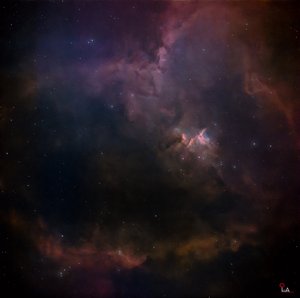
When Auto Guiding Turns Into a Nightmare — My Struggle with the Target
For me personally, the auto guiding process has always been one of the most frustrating parts of astrophotography. Especially for people like me who use a duo system where the main camera and guiding camera are integrated together, guiding requires a lot of careful attention. This happens because there is a dual-band filter in front of the guiding camera, which blocks some of the light that would otherwise reach the guiding sensor. As a result, fewer photons are available for guiding. For those who use a separate guiding setup instead of integrating the auto-guiding system with the main camera system, guiding-related issues are generally less significant and are usually not as pronounced as they are with a dual-band filter system. This post will mainly focus on the auto-guiding issues that you may encounter when using a dual-band (duo) filter system, based on real-world experience.. Honestly, astrophotography is one of those hobbies where no matter how many years of experience you have, there will always be some kind of problem waiting for you. The reason is simple — the subjects we photograph are impossibly far away and completely beyond our control, while most of the equipment we use comes in modular systems where issues can happen at any point. Back in my early days, every imaging session started with thoughts like: “What problem am I going to face tonight?” and “Will guiding even work properly?” Especially the nightmare known as auto guiding.
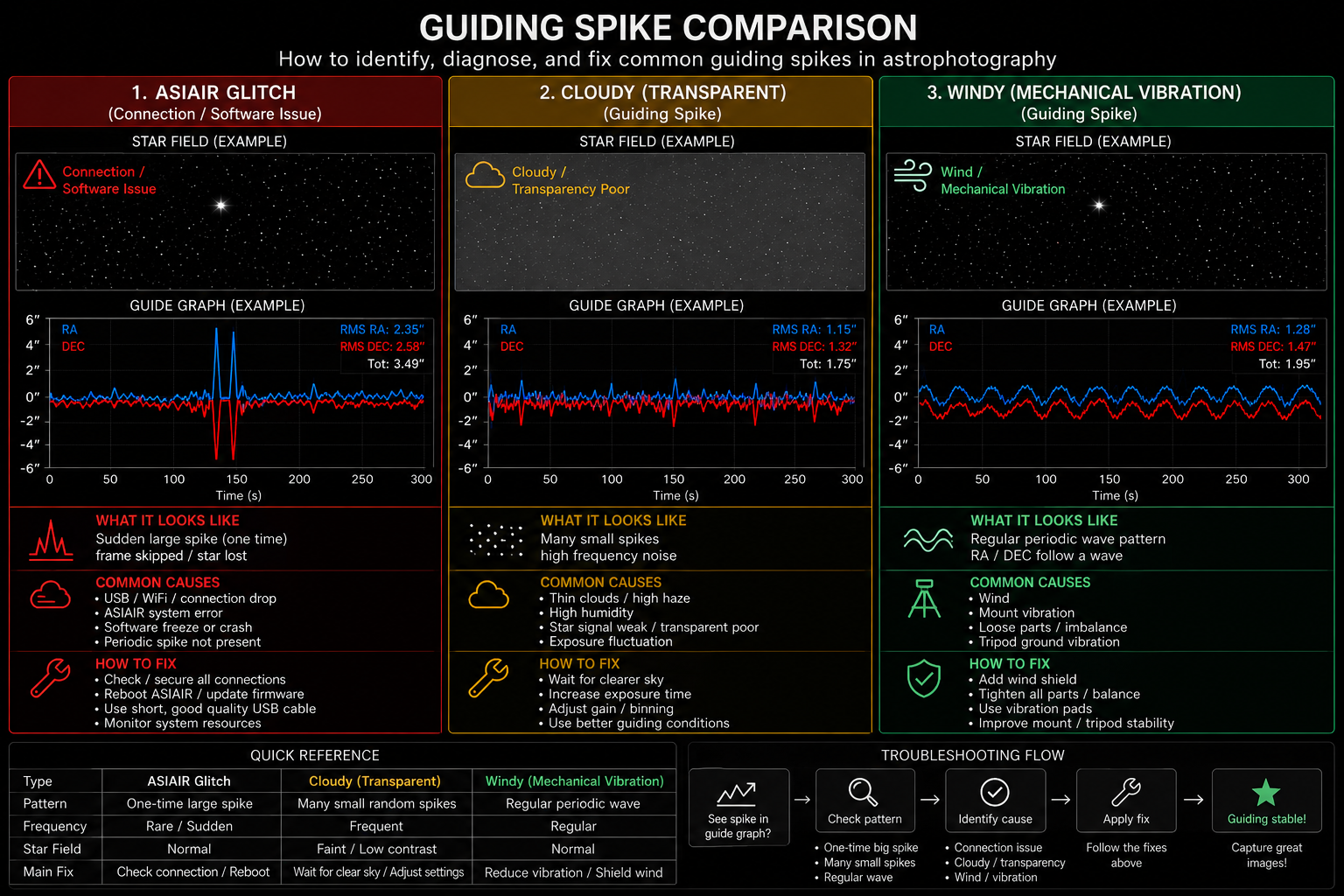
The first major problem I encountered with auto guiding was not being able to get the Total RMS number below 3.0–4.0. Normally, guiding becomes smooth only when the Total number stays below 1.0. If the guiding numbers go above 1.0, there are several adjustments you can try: slightly shifting the telescope forward or backward on the mount, repositioning the counterweight, changing the guiding rate settings in the ASIAIR mount settings, adjusting Calibration Step, Max DEC Duration, and Max RA Duration values, or tuning the RA and DEC aggression numbers in the guiding display. All these can help bring the Total RMS back below 1.0. If those still don’t work, you can switch the main camera to act as the guide camera and use the guide sensor focus knob to make the stars as small and as round as possible. Even after trying all of that, if the issue still persists, my final recommendation is simply restarting the ASIAIR application or fully power cycling the device. Auto guider problems become especially stressful when your weather and imaging window are already extremely tight. At that point, not only do you lose three or four precious hours, but it also feels mentally exhausting when nearly every troubleshooting option has already been used, and the problem still refuses to go away. It becomes even more frustrating when dawn is approaching, and you already know the weather will get worse over the next few days. Do you know what the most frustrating part is? During summer, in places like the San Francisco Bay Area where I currently live, the weather stays sunny all day long, but as soon as night falls, fog from the coastal side quickly rolls in and covers the sky the entire night. Trying to do astrophotography under conditions like that is really tough. It doesn’t happen every single day, but once it starts, you usually can’t do anything for at least a week. And if luck is really against you, you could end up sitting around unable to shoot for nearly a month.
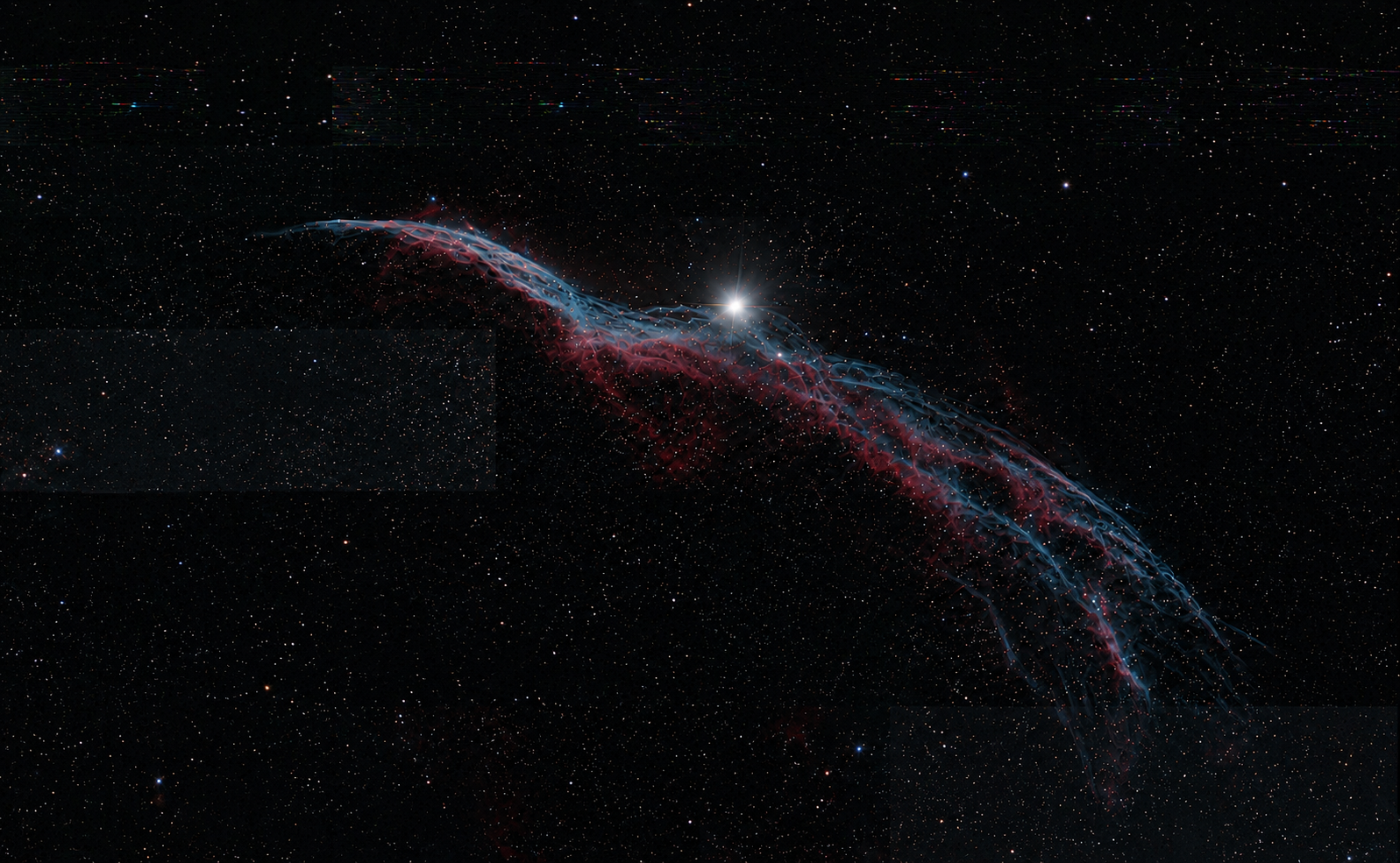
The night I captured the Western Veil Nebula was exactly one of those nightmare situations. Starting around 1:30 AM, the auto guiding problem continued all the way until 4:00 AM without being resolved. The Total RMS number kept jumping wildly between 0.65 and 4.5 the entire time. I tried every possible adjustment I could think of, but nothing improved. Since I had successfully imaged that same constellation on previous nights, I assumed things would eventually stabilize, but no matter what I did, nothing changed. I even moved the guiding area toward a region with denser star fields, yet the issue still remained.
Since I’m talking about it already, I’d also like to share a useful tip. You can actually choose where to perform guiding. If the stars around your target are too dim or too sparse, you can move the guiding area to a nearby region with more stars. The ideal place for guiding is around the intersection between the celestial equator and the meridian line. If your target is in the east, guide near the eastern intersection point. If your target is in the west, use the western side instead. Once auto guiding starts successfully, don’t forget to move the telescope back to your actual target and run plate solving again. After moving back to the target, guiding may briefly start looping — don’t panic. Just wait a moment, and it will usually recover by itself. Most of the time, guiding from a nearby dense star field works very well, although failures can still occasionally happen.
Another important feature inside the guiding settings is something called Dithering. What dithering does is slightly move the mount in random directions after every frame or every few frames. This helps reduce sensor noise, hot pixels, and walking noise patterns during stacking.
For example:
Frame 1 → target is positioned here on the sensor
Dither
Frame 2 → target shifts slightly by a few pixels
Dither
Frame 3 → shifts again
Because of these tiny movements, stacking software can combine the real signal while removing repeating noise patterns. Dithering is especially effective against walking noise, hot pixels, fixed pattern noise, and banding. Without dithering, long exposures and multi-night integrations can produce ugly streak-like noise patterns across the image. For OSC and cooled cameras, especially, dithering is considered almost mandatory.
Anyway, back to the nightmare. Even after moving the guiding area to a denser star cluster, the issue still wouldn’t improve, and honestly I was getting mentally exhausted. My original goal for that night was to capture at least 30 frames, but at that point I felt lucky if I could even get 5 usable frames. To make things worse, the weather forecast showed several bad nights coming immediately afterward, meaning I might have to wait another four or five days before imaging again. Finally, after exhausting every possible solution, I decided to completely power cycle the ASIAIR. Ironically, actually, it turned out to be an ASIAIR glitch. I only learned that day that simply turning the power off and back on would fix everything. That’s why I ended up struggling with it for nearly three hours. The moment it restarted, guiding suddenly became perfectly stable again, and the Total RMS settled around 0.4. Unfortunately, by then I only had about 45 minutes left before dawn, so I managed to capture only 7 frames. Since I wanted around 90 total frames, I’ll probably need another three nights to finish the project.
In conclusion, auto guiding problems are not the kind of issues that can always be solved with one or two quick adjustments. If you ever encounter them yourself, try to stay calm and work through the troubleshooting methods I mentioned above instead of getting overwhelmed. One more important thing — if your Total RMS stays above 1.5 for a long period of time, stop imaging immediately and start troubleshooting. Otherwise, your images will become blurry, and your stars will start stretching into star trails. Also, even thin clouds in the sky can interfere with auto guiding, so whenever possible, it’s always best to wait for a completely clear night before doing astrophotography.
Clear skies and happy observing…..
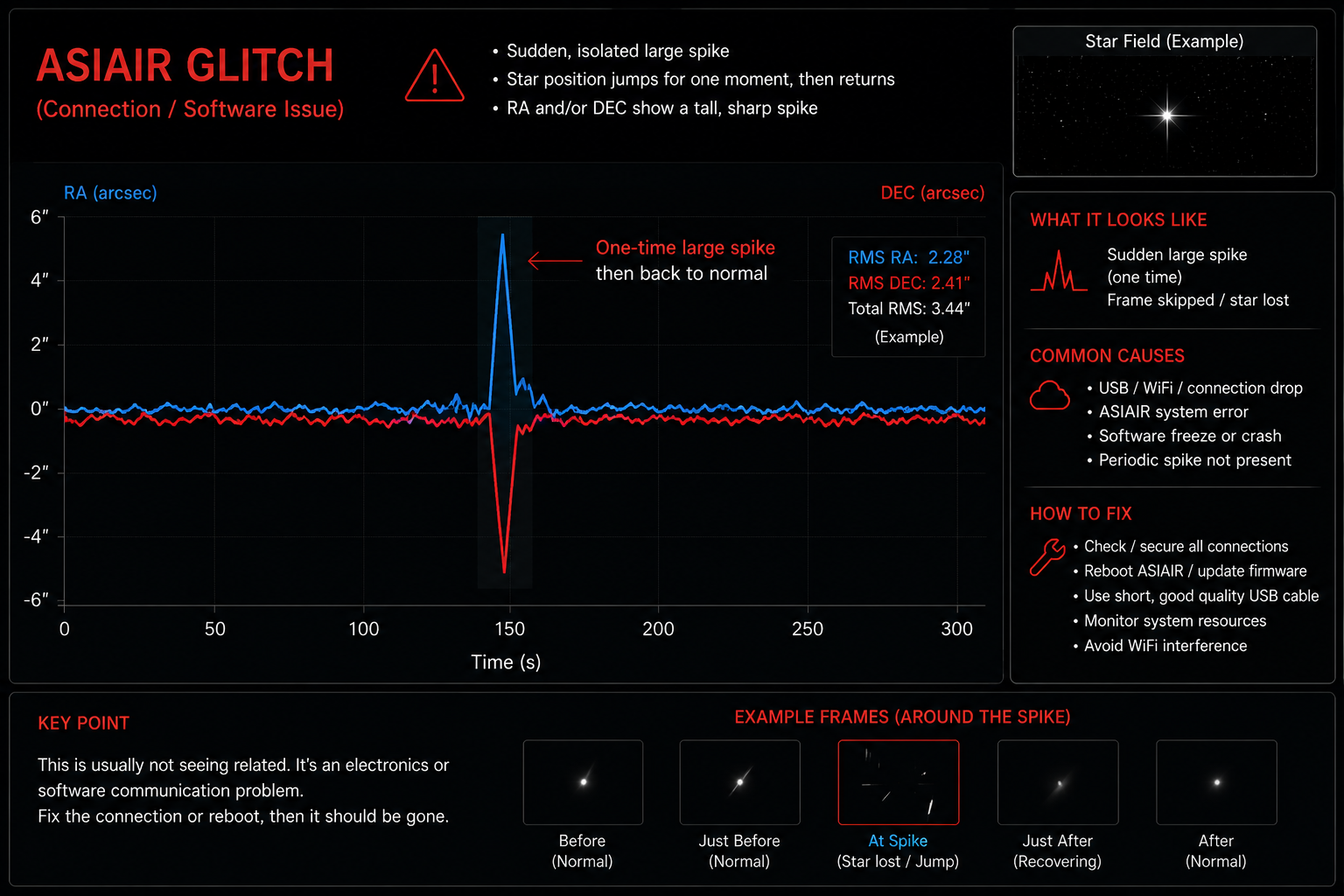
With ASIAIR glitch issue
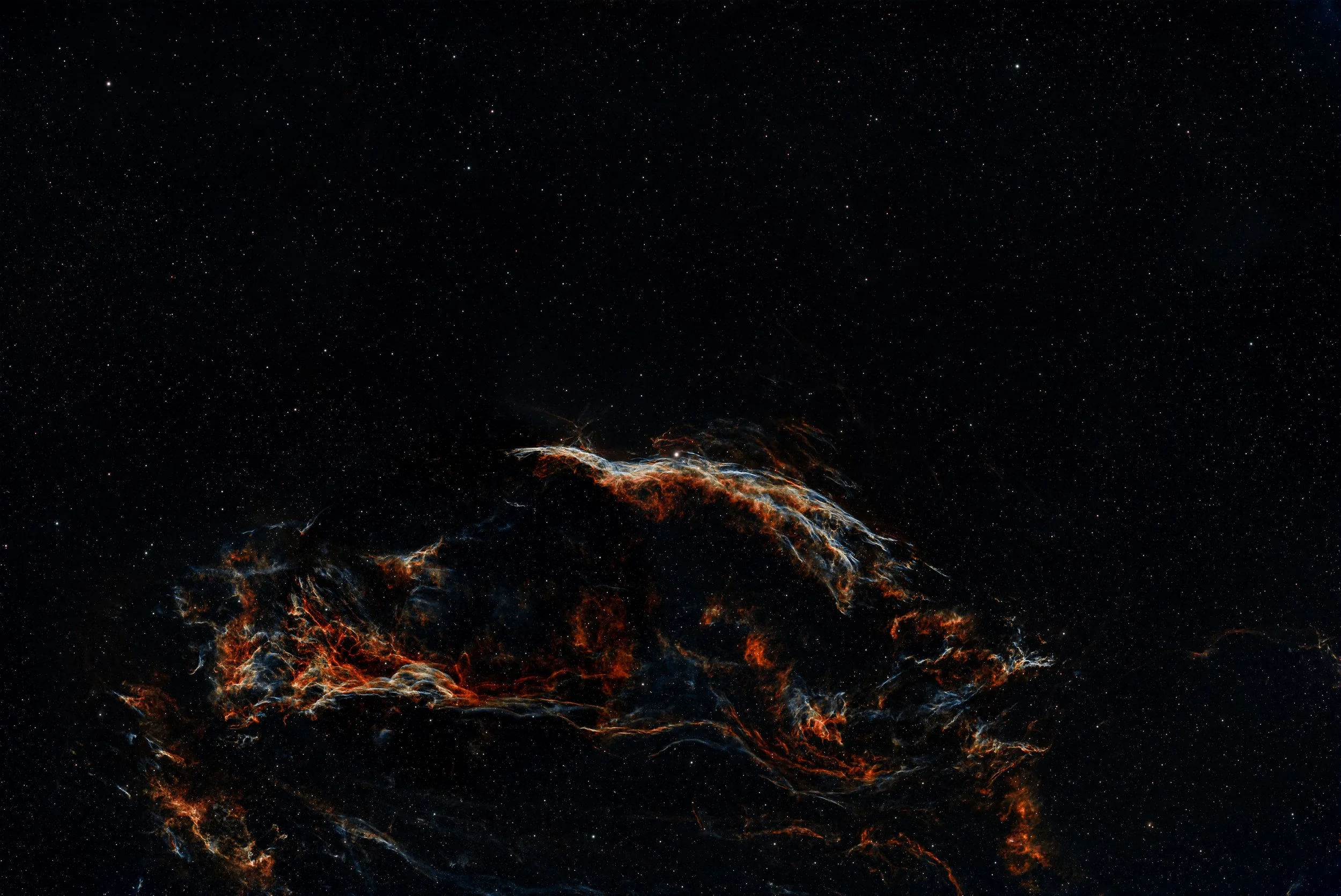
Without glitch issue
တစ်ခြားသူတွေတော့မပြောတတ်ဘူးပေါ့နော ကျွန်တော့်အတွက်ကတော့ auto guiding process ကတော်တော်ပြဿနာပေးတာဗျ။ အထူးသဖြင့် main camera နဲ့ guiding camera တွဲပါတယ့် duo system ကိုသုံးတယ့်ကျွန်တော့်လိုလူမျိုးအတွက်က guiding process လုပ်ရာမှာတော်တော်သတိထားရပါတယ်။ ဘာဖြစ်လို့လဲဆိုတော့ ကိုယ့်ရဲ့ guiding camera အရှေ့မှာ duel-band filter ရှိနေတာမို့လို့ guiding sensor ကိုရောက်ရမယ့်အလင်းတွေထဲကတစ်ချို့ကို block လိုက်တာကြောင့်ပဲဖြစ်ပါတယ်။ Auto guiding ကို main camera system နဲ့တွဲသုံးတာမဟုတ်ပဲ သပ်သပ်ခွဲပြီးတပ်သုံးတယ့်သူတွေအတွက်တော့ guiding ကြောင့်ဖြစ်တယ့်ပြဿနာက duo system လောက်မရှိနိုင်ပါဘူးခင်ဗျ။ ဒီပိုစ့်ကလည်း duo system သုံးရင်တွေ့ကြုံရမယ့် auto guiding issue ကို အဓိကထားပြီးရေးမှာဖြစ်ပါတယ်ခင်ဗျ။ အမှန်က astrophotography ဆိုတာ ရိုက်သက်နှစ်ဘယ်လောက်ပဲကြာကြာ အတွေ့အကြုံဘယ်လောက်ပဲရှိရှိပြဿနာကတစ်ခုမဟုတ်တစ်ခုအမြဲကြုံနေရမယ့် genre တစ်ခုဆိုရင်တောင်ဆိုလို့ရလောက်တယ်။ ဘာဖြစ်လို့လဲဆိုတော့ ရိုက်ရတယ့် subjects တွေက ဘယ်လိုမှပြုပြင်လို့မရတယ့် ကိုယ်လက်လှမ်းမမှီတယ့်အကွာအဝေးမှာရှိနေတာရယ် သုံးရတယ့် gears တွေကလည်းအများအားဖြင့် modular system တွေမို့လို့ ပြဿနာတစ်ခုမဟုတ်တစ်ခုဖြစ်နေတတ်တာကတော့ မထူးဆန်းဘူးလို့ပဲဆိုရမလားပေါ့လေ။ အစောပိုင်းကာလတွေတုန်းကဆို ဓာတ်ပုံရိုက်တိုင်း ဒီညငါဘာပြဿနာများကြုံရအုန်းမလဲ၊ guiding ရောအဆင်ပြေပမလားဆိုတယ့်အတွေးတွေတစ်ပုံတစ်ပင်ကြီးနဲ့ရိုက်ခဲ့ရတာ အထူးသဖြင့် auto guiding nightmare ကြီးနဲ့ပေါ့။
ကျွန်တော် Auto guiding နဲ့ပတ်သက်ပြီးပထမဦးဆုံးကြုံရတယ့်ပြဿနာကတော့ Tot number 3.0-4.0 အောက်ကိုမကျတာပါပဲ။ Tot နံပါတ်တွေကအမြဲတမ်း 1.0 အောက်မှာရှိနေမှသာ guiding က smooth ဖြစ်တာမို့လို့ အကယ်၍ guiding number တွေက 1.0 ရဲ့အထက်ကိုရောက်နေပြီဆိုရင် telescope ကို mount အထိုင်မှာရှေ့တိုးနောက်ဆုတ်လုပ်၍ပဲဖြစ်ဖြစ်၊ သုံးထားတယ့် counter weight ကိုနေရာအရွှေ့အပြောင်းလုပ်၍ပဲဖြစ်ဖြစ်၊ asiair mount setting အထဲက guiding rate number တွေကိုပြောင်းကြည့်တာပဲဖြစ်ဖြစ်၊ guide setting အထဲက Calibration Step, Max DEC Duration, Max RA Duration တွေရဲဂဏန်းတွေကိုချိန်ညှိလို့ပဲဖြစ်ဖြစ်၊ auto guiding display အထဲက RA နဲ့ DEC တို့ရဲ့ aggression number တွေကိုအတိုးအလျှော့လုပ်၍ပဲဖြစ်ဖြစ် ဂဏန်းတွေကို 1.0 အောက်ကိုပြန်ရောက်အောင်ချိန်ညှိနိုင်ပါတယ်။ အဲဒါတွေနဲ့မှအဆင်မပြေသေးဘူးဆိုရင် main camera ကို guide camera အနေနဲ့ပြောင်းသုံးပြီး camera မှာပါလာတယ့် guide sensor focus knob ကိုအသုံးပြုကာ ကြယ်တွေကိုအတတ်နိုင်ဆုံး အရွယ်အစားအသေးဆုံးနဲ့အဝိုင်းဆုံးဖြစ်အောင်ပြုလုပ်ခြင်းဖြစ်လည်း ချိန်ညှိလို့ရပါသေးတယ်။ အဲဒီအချက်တွေအားလုံးအသုံးပြုပြီးသည့်တိုင်အောင်အဆင်မပြေသေးဘူးဆိုရင်တော့နောက်ဆုံး option ဖြစ်တယ့် asiair application ကို restart ဒါမှမဟုတ် power ကို on/off ပြန်လုပ်ပြီးအသုံးပြုဖို့တိုက်တွန်းပါရစေ။ Auto guider ပြဿနာကလေ ကိုယ့်မှာရိုက်ကူးရတယ့် ရာသီဥတုနဲ့အချိန်ရဲ့ window ကလုံးဝ tight ဖြစ်နေတယ့်အချိန်မှာဖြစ်ပြီဟေ့ဆိုရင် စိတ်ရှုပ်စရာအကောင်းဆုံးပဲပေါ့ခင်ဗျာ။ အဲ့ဒီအခါကျရင်လေ အချိန်ကသာ သုံးလေးနာရီလောက်ကြာသွားတယ့်အပြင် ကိုယ့်မှာရှိတယ့်ဖြေရှင်းစရာ options တွေအားလုံးက အသုံးပြုလို့ကုန်သလောက်နီးပါးရှိနေသည့်တိုင်အောင် ပြဿနာကပြေလည်မသွားတာကြီးက လူရဲ့စိတ်ကိုတော်တော်ကြီးကို ပင်ပန်းစေတာဗျ။ တစ်ဖက်မှာကမိုးကလင်းလာတော့မယ် ပြီးတော့နောက်ရက်တွေကစပြီးရာသီဥတုကလည်း ဆိုးလာဖို့ပဲရှိတော့တယ်လို့ သိနေရတယ့်အခါတွေမျိုးဆိုရင် ပိုပြီးတော့ struggle ဖြစ်တာပေါ့။ စိတ်ညစ်စရာအကောင်းဆုံးကဘာလည်းသိလား နွေရာသီမှာ အခုကျွန်တော်နေတယ့် San Francisco bay area လိုမျိုးနေ့ခင်းဖက်ဆိုတနေကုန်နေသာနေပြီး ညဖက်ရောက်တာနဲ့ကမ်းခြေဖက်ကမြူခိုးတွေချက်ချင်းတက်လာပြီး တစ်ညလုံးမြူတွေဆိုင်းနေတတ်တယ့်နေရာမျိုးကနေပြီး astrophotography ရိုက်ရတာမျိုးပေါ့ဗျာ။ နေ့တိုင်းတော့မဟုတ်ပေမယ့် ဖြစ်ပြီဟေ့ဆိုရင် အနည်းဆုံး တစ်ပတ်လောက်ကဘာမှလုပ်လို့မရဘူး ကံမကောင်းရင်တော့တစ်လလောက်က ငုတ်တုတ်ထိုင်နေတော့ပဲဗျ။
ကျွန်တော် Western Veil Nebula ရိုက်တယ့်ညကဆိုရင် မနက်စောစော 1:30 AM လောက်ကနေစပြီးပြဿနာတက်နေတယ့် auto guiding ကမနက် 4 AM အထိကိုဖြေရှင်းလို့မပြီးဘူး။ ဖြစ်ပုံကဒီလိုဗျ Tot ဂဏန်းတွေက 0.65 နဲ့ 4.5 ကြားထဲမှာကစားနေတာတစ်ချိန်လုံးပဲ။ ရှိသမျှ options အားလုံးနဲ့လဲချိန်ညှိကြည့်ပြီးတာတောင် လုံးဝပြန်ကောင်းမလာဘူးလေ။ အရင်ရက်တွေက ကောင်းကောင်းရိုက်လို့ရနေတယ့် constellation ပဲမို့လို့အဆင်ပြေမှာပါလေလို့တွေးပြီး ကြိုးစားပြီးချိန်ညှိလည်း ဘာမှထူးမလာဘူးဗျ။ နောက်ဆုံး Guiding area ကိုကြယ်အစုအဝေးတွေများတယ့်နေရာကို လှမ်းပြီးလုပ်တာတောင် အဆင်ကပြေမလာဘူးဗျ။ ဒါနဲ့ကြုံတုန်းလေး တစ်ခုလောက်တော့ဝေမျှပေးချင်တယ်ဗျ။ Guiding လုပ်တယ့်ကြယ်အစုအဝေးကိုရွေးချယ်လို့ရတယ်နော်။ ကိုယ်ရိုက်ရမယ့် subject နေရာပတ်ဝန်းကျင်ကကြယ်တွေကနည်းနေတာပဲဖြစ်ဖြစ် မှိန်နေတာပဲဖြစ်ဖြစ် guiding လုပ်ရတာအဆင်မပြေဘူးဆိုရင် ကိုယ့်အနီးအနားကကြယ်တွေရဲ့နေရာကိုရွှေ့ပြီးလုပ်လို့ရပါတယ်။ ကြယ်တွေကို အကောင်းဆုံး guiding လုပ်လို့ရတယ့်နေရာကတော့ Equator နဲ့ Meridian လိုင်းနှစ်ခုဆုံတယ့်နေရာပါပဲ ကိုယ့်ရိုက်မယ့် subject ကအရှေ့ဖက်မှာရှိတယ်ဆိုရင် အရှေ့ဖက်ကအဲဒီလိုင်းနှစ်လိုင်းဆုံတယ့်နေရာမှာလုပ်ရမှာဖြစ်ပြီး အနောက်ဖက်မှာဆိုရင်တော့ အနောက်ဖက်ကလိုင်းနှစ်လိုင်းဆုံတယ့်နေရာမှာလုပ်ရမှာပါ။ တစ်ခုပဲ auto guider run ပြီးရင်တော့ telescope ကိုကိုယ်ရိုက်မယ့် subject နေရာကိုပြန်ရွှေ့ဖို့နဲ့ plate solving လုပ်ဖို့တော့မမေ့ပါနဲ့။ Telescope ကိုကိုယ့်ရိုက်မယ့်နေရာကို ရွှေ့လိုက်တယ့်အခါကြရင် guiding ကခဏတော့ looping ဖြစ်သွားပါလိမ့်မယ်။ မစိုးရိမ်ပါနဲ့ ပြဿနာမရှိပါဘူး ခဏလေးပဲစောင့်လိုက်ပါ သူ့ဘာသာသူ guiding ပြန်လုပ်ပါလိမ့်မယ်။ အများအားဖြင့်တော့ အခုလိုအဝေးကကြယ်စုကိုလှမ်းပြီး guiding လုပ်တာကအဆင်ပြေတာများပါတယ်။ တစ်ခါတစ်လေပဲ fail ဖြစ်တာပါ ဒါကလည်းဖြစ်ခဲတယ်လို့သိရပါတယ်ခင်ဗျ။ နောက်ပြီး guiding options တွေအထဲမှာ Dithering ဆိုတယ့် feature တစ်ခုပါပါတယ်။ သူရဲ့လုပ်ဆောင်ချက်ကဘာလဲဆိုတော့ ပုံတစ်ပုံရိုက်ပြီးတိုင်း (သို့) frame အနည်းငယ်ရိုက်ပြီးတိုင်း mount ကို အရမ်းသေးသေးလေး random direction နဲ့ရွှေ့ပေးတဲ့ feature ပါ။ Astrophotography မှာ sensor noise, hot pixel, walking noise pattern တွေကို stack လုပ်တဲ့အခါ မပေါ်အောင် ကူညီပေးပါတယ်။
ဥပမာ...
Frame 1 → target က sensor ပေါ်မှာ ဒီနေရာ
Dither လုပ်
Frame 2 → target ကနေ pixel အနည်းငယ်ရွှေ့သွားပြီး
Dither လုပ်
Frame 3 → ထပ်ရွှေ့
ဒီလို slight movement တွေကြောင့် stacking software က “signal” ကိုပဲပေါင်းပြီး noise pattern တွေကိုဖယ်ရှားလို့ရသွားတာပါ။ အထူးသဖြင့် Walking noise, Hot pixels, Fixed pattern noise, Banding တွေကို အရမ်းလျော့စေတယ်။ ဒါဆို Dithering မလုပ်ရင်ဘာဖြစ်လဲ။ Multi-night integration နဲ့ long exposure တွေမှာ—တန်းလိုက် noise မိုးရွာသလို pattern color streak တွေထွက်လာနိုင်ပါတယ်။ အထူးသဖြင့် OSC camera တွေ၊ cooled camera တွေမှာ dithering က almost mandatory လို့တောင်ပြောကြပါတယ်ခင်ဗျ။
ကဲ...ပြဿနာတက်နေတယ့်အကြောင်းလေးပြန်ဆက်ရအောင်ဗျ။ Guiding ကကြယ်အစုအဝေးများတယ့်နေရာကိုရွှေ့ပြီးလုပ်တာတောင်အဆင်မပြေတော့ ကျွန်တော်လည်းတော်တော်ကြီးကိုစိတ်ပင်ပန်းလာခဲ့ပါတယ်။ ကိုယ့်ရဲ့ target ကအဲ့ဒီညမှာအနည်းဆုံး 30 frames လောက်တော့ရအောင်ရိုက်မယ်လို့ရည်ရွယ်ထားတာ အခုပုံနဲ့ဆို 5 frames ရရင်တောင်ကံကောင်းဆိုတယ့် အခြေအနေမျိုးဆိုက်နေပြီလေ။ ပြီးတော့အဲ့ညပြီးသွားတာနဲ့နောက်ရက်တွေဆို ရာသီဥတုကပြန်ပြီးဆိုးလာမှာဆိုတော့ အနည်းဆုံးနောက်ထပ် လေးငါးရက်လောက်တော့စောင့်နေရတော့မှာပါ။ နောက်ဆုံးဘယ်လိုမှလုပ်လို့မရတော့တာနဲ့ asiair ကို power on/off လုပ်လိုက်ရတော့တယ် (အမှန်က asiair glitch ဖြစ်တယ့်ပြဿနာမို့လို့ သူ့ရဲ့ power ကိုပိတ်ပြီးပြန်ဖွင့်လိုက်ရင် အားလုံးအဆင်ပြေသွားမယ်ဆိုတာကို အဲဒီနေ့ကြမှကျွန်တော်သိလိုက်ရတာပါ ဒါကြောင့်လည်း သုံးနာရီနီးပါးလောက်တိုင်ပတ်နေတာပေါ့ခင်ဗျ)။ အဲဒီတော့မှပဲ guiding ကပုံမှန်ပြန်ဖြစ်သွားပြီး Tot number တွေက 0.4 ဝန်းကျင်လောက်မှာပဲပြေးနေတော့တယ်လေ။ ဒါပေမယ့်အချိန်ကလည်း လေးဆယ့်ငါးမိနစ်လောက်ပဲကျန်တော့လို့ 7 frames လောက်ပဲရိုက်လို့ရခဲ့တယ်။ Frames စုစုပေါင်း ကိုးဆယ်လောက်လိုချင်တာဆိုတော့ နောက်ထပ်သုံးရက်လောက်တော့ ထပ်ရိုက်ရအုန်းတော့မှာပဲခင်ဗျ။
အနှစ်ချုပ်အနေနဲ့ပြောချင်တာကတော့ auto guiding ပြဿနာက တစ်ခြားပြဿနာတွေလိုမျိုး တစ်ခုနှစ်ခုလောက်ချိန်ညှိလိုက်ရုံနဲ့ ပြေလည်သွားမယ့်ပြဿနာမျိုးမဟုတ်လို့ အကယ်၍မိတ်ဆွေတို့အနေနဲ့ကြုံတွေ့လာရပြီဆိုရင် စိတ်အေးအေးထားပြီး ကျွန်တော်အထက်မှာပြောပြသွားတယ့်နည်းလမ်းတွေနဲ့ဖြေရှင်းလို့ရတာမို့လို့ သိပ်ပြီးတော့ struggle မဖြစ်ကြပါနဲ့လို့ပြောချင်ပါတယ်ခင်ဗျ။ နောက်တစ်ခုက Tot number က 1.5 အထက်မှာအချိန်တော်တော်များများရှိနေပြီဆိုရင် ပုံရိုက်နေတာကိုချက်ချင်းရပ်လိုက်ပြီး ချိန်ညှိဖို့ပြင်ဆင်ပါ။ ဒါမှမဟုတ်ပဲနဲ့ အဲ့ဒီဂဏန်းကြီးနဲ့ဆက်ရိုက်နေမယ်ဆိုရင်တော့ ကိုယ့်ရဲ့ပုံထွက်က blur ဖြစ်လာမှာဖြစ်ပြီး ကြယ်တွေကလည်း star trail လိုမျိုးရှည်ထွက်လာမှာပါ။ နောက်ပြီးကိုယ်ရိုက်တယ့်ညရဲ့ကောင်းကင်မှာ တိမ်ပါးပါးလေးရှိနေမယ်ဆိုရင်တောင် auto guiding ကပြဿနာပေးနိုင်တာမို့လို့ ဖြစ်နိုင်ရင်ကောင်းကင်ကြည်လင်တယ့်ညမျိုးတွေကိုစောင့်ပြီးမှ ရိုက်ကူးရေးလုပ်တာကအကောင်းဆုံးပါပဲလို့ အကြံပေးပါရစေခင်ဗျ.....
မိုးသားကင်းစင်ကြည်လင်သောညများ ဖြစ်ပါစေ — အမြင်ကောင်းများနှင့် အောင်မြင်သော observation များရရှိပါစေ.....